


Cloud-Based BACnet Data Logger and HVAC Monitoring
Vigilia is a cloud-based BACnet network recorder that captures every data point in your building automation system (temperature sensors, valve positions, fan statuses, energy meters) and stores 12 months of history by default, with unlimited retention available.
Unlike native trend logs limited to individual controllers, Vigilia records your entire network and makes the data instantly accessible from any browser. It solves the "limited trend log memory" problem by providing unlimited cloud storage for all your BACnet objects.
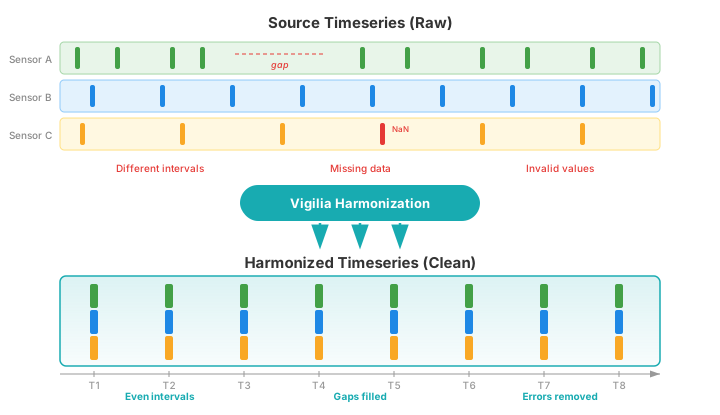
Data is automatically harmonized: timestamps are aligned across sources, gaps are filled, and invalid values are removed. You always get clean, analysis-ready timeseries.
Setup takes about 5 minutes. Install the Wacnet BACnet Explorer, enter your credentials, and click Start. No VPN, no port forwarding, no IT department needed.
Used by hospitals, universities, cities, and commissioning firms including Johnson Controls and SNC-Lavalin. Compatible with Trane, Honeywell, Delta Controls, Distech, Schneider Electric, Siemens, and any BACnet/IP-compliant controller.
Best for: facility managers who need historical HVAC data without IT overhead, commissioning agents who need to verify sequences of operation with real data, and technicians who want to diagnose problems remotely before dispatching a truck.
Cities, hospitals, schools and commissioning firms are using Vigilia. You should try their secret weapon...










Record, Analyze, and Share Your BACnet Data
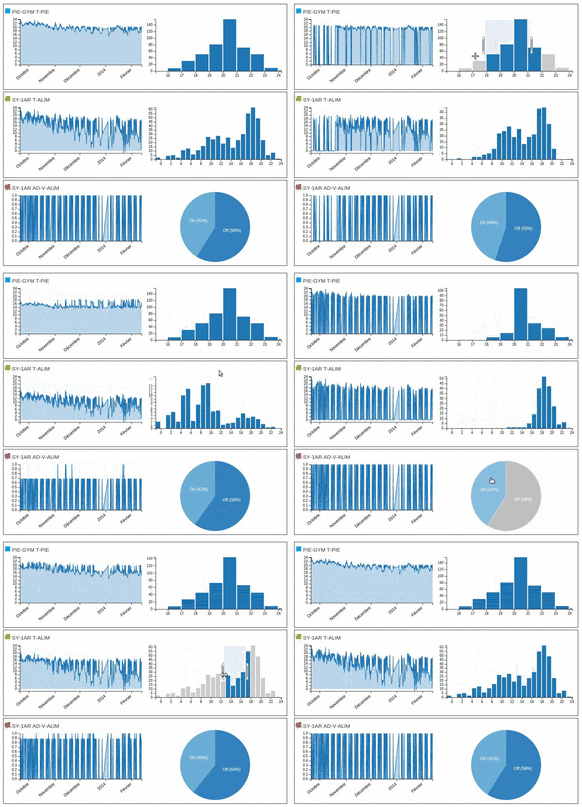
A Time Machine for HVAC
Every time a problem occurs, you have to go check what *happened*.
Was it the humidity? The boiler?
What were the exact conditions under which the problem occured?
Vigilia lets you rewind the clock. Go back in time and see exactly what caused the problem.
Simple Data Filtering
Whenever you are studying a system, you have to filter out some unwanted data. With Vigilia, we made sure that filtering was as simple as dragging a mouse.
Are your tools good enough for your needs? How would you filter these simple constraints?
- The data for the previous day;
- When the outside humidity was above 50%;
- Last week, when the fan was working and the room occupied.
No arcane knowledge, no obscure query mecanism...
Just show Vigilia what you want and instantly get the result.
Automatic Data Harmonization
Real-world BACnet data is messy: sensors report at different intervals, devices go offline, values contain errors. Most analysis tools choke on this.
Vigilia automatically harmonizes your timeseries — aligning timestamps across all data sources, filling gaps, and removing invalid values. The result is clean, evenly-spaced data ready for analysis.
This means you can overlay supply air temperature, zone temperature, and valve position on the same graph without worrying about mismatched timestamps or missing data points.
Virtual Objects : The Data You Really Want
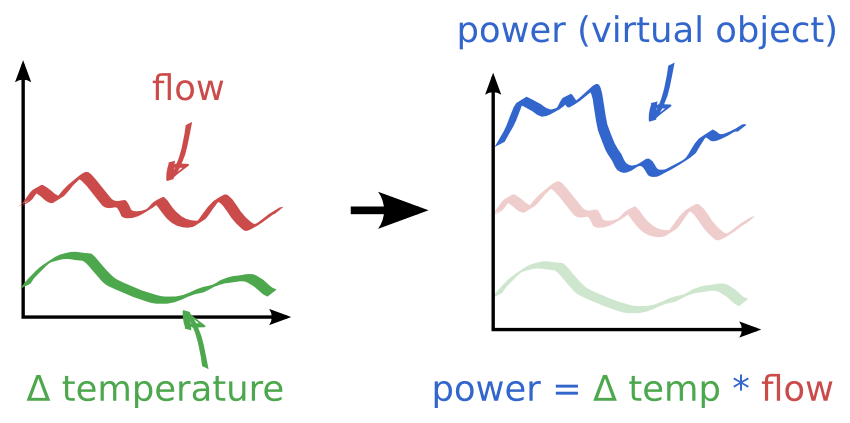
With virtual objects, you can abstract away the sensors and just keep the really interesting stuff.
Combine temperature and humidity readings into a comfort index. Calculate total energy consumption from multiple meters. Derive efficiency ratios from raw sensor data.
Define custom equations that run on your historical data, and Vigilia computes the results on the fly.
Device Monitoring & Alerts
Vigilia watches your network around the clock. If a device stops reporting data, you get an email alert before anyone notices a problem on site.
Set thresholds per device — a rooftop unit might need 1-hour alerting while a sub-meter is fine with daily checks.
No more surprise calls from tenants about failed equipment. Know first, act fast.
"Device 1200 — no data received in the last 5 hours"
Alert sent to your team
Built-in Statistics
| Avg | Min | Max | |
|---|---|---|---|
| Zone Temp | 22.1 | 19.8 | 24.5 |
| Supply Air | 14.3 | 13.1 | 16.0 |
| kW | 45.2 | 12.0 | 87.6 |
Select any time range and Vigilia computes averages, minimums, maximums, and record counts instantly.
Need energy totals? Sum-hours converts power readings (kW) into energy (kWh) automatically — no spreadsheet required.
Export your filtered data as CSV for use in Excel, Python, or any analysis tool you prefer.
REST API & Integration
Vigilia exposes a RESTful API with Swagger documentation. Query historical data, list devices, and retrieve object properties programmatically.
Use it from Python scripts, Excel macros, custom dashboards, or any tool that speaks HTTP. Authenticate with an API key — no complex OAuth flow.
Import historical data via CSV to consolidate your existing logs into one platform.
Why Vigilia Instead of Native Trend Logs?
Most BACnet controllers have built-in trend logging, but they come with hard limitations: storage is measured in hundreds of records per object, configuration must be done controller by controller, and accessing the data remotely usually requires a VPN and proprietary software.
| Vigilia | Native Trend Logs | |
|---|---|---|
| Scope | Entire network — all devices, all objects | Per controller, manually configured |
| Storage | 12 months in the cloud (configurable) | Hundreds of records per object (controller memory) |
| Remote Access | Any browser — share a link | VPN + proprietary software |
| Setup | 5 minutes — one configuration for the whole network | Manual per-controller configuration |
| Sharing | Send a URL — instant access | Export files, email attachments |
Who Uses Vigilia?
Technicians
Spot defective devices and faulty control sequences from your desk before dispatching a truck.
Facility Managers
Keep an eye on comfort, energy, and equipment health across all your buildings from a single dashboard.
Commissioning Agents
Verify sequences of operation against design intent with hard data. Share findings with the entire project team via a link.
Engineers
Size equipment based on real load profiles instead of educated guesses. Validate energy models against measured performance.
How It Works :
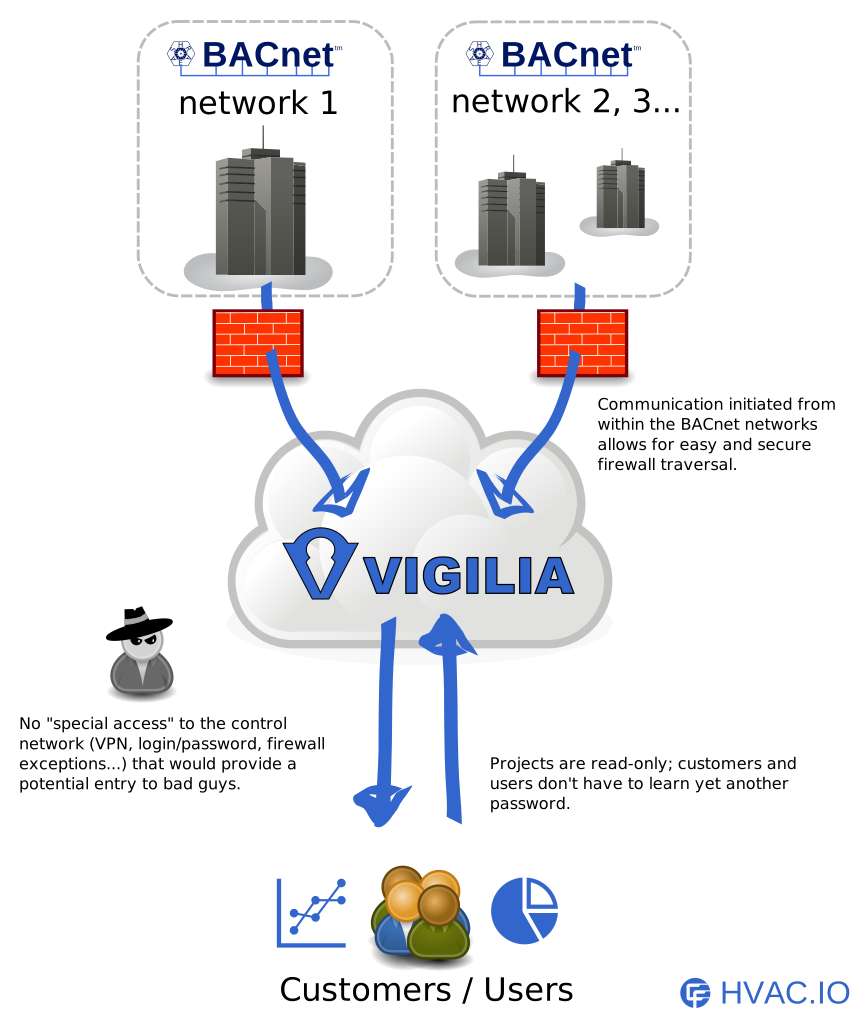
Wacnet runs on your local network and scans all BACnet/IP devices at regular intervals. It pushes the data outbound over HTTPS to the Vigilia cloud — no inbound ports, no VPN. You then access your historical data from any browser via vigilia.hvac.io.
Technical Specifications
| Protocol | BACnet/IP, BACnet/MSTP (via IP router) |
|---|---|
| Object Types | All standard BACnet objects — Analog Input/Output/Value, Binary Input/Output/Value, Multi-state, Schedule, Trend Log, and more |
| Tested With | Trane, Johnson Controls, Honeywell, Delta Controls, Distech Controls, Reliable Controls, Schneider Electric, Siemens |
| Data Formats | JSON, CSV, Transit, EDN |
| Security | TLS encryption, API key authentication, private projects, outbound-only traffic (firewall friendly). We do not share, sell, or mine your building data. |
| Scan Interval | Configurable, from 5 minutes |
| Data Retention | 12 months included (custom plans available) |
Deployment Options
Windows
Run Wacnet on any Windows 10/11 machine. Double-click the JAR file or use the command line for headless operation.
Linux / Raspberry Pi
Deploy on a Raspberry Pi or any Linux server for a low-cost, permanent BACnet data logger. Ideal for remote sites.
macOS
Works out of the box on macOS with Java installed.
Self-Hosted
Need full control? Run the Vigilia server on your own infrastructure. Contact us for the self-hosted option.
Frequently Asked Questions
How long does it take to set up?
What is a BACnet object?
Is my data secure?
Does Vigilia need port forwarding or a VPN?
Can it handle large networks with thousands of objects?
How long is data retained?