



Free Open Source BACnet Explorer and REST API Toolkit
Wacnet is a free, open-source BACnet/IP explorer that runs as a single JAR file with zero installation — download, double-click, and browse your entire BACnet network in under 30 seconds. Unlike proprietary BACnet tools that cost thousands of dollars per seat, Wacnet is completely free (GPLv3) and works on Windows, macOS, and Linux. It includes a web-based device explorer, a full REST API with Swagger documentation for integration with Python, Excel, or any HTTP client, and an interactive Clojure REPL for power users who need to script custom BACnet operations. Wacnet also has built-in support for Vigilia, enabling automatic cloud-based recording of your BACnet network at configurable intervals.
Best for: system integrators who need a quick diagnostic tool for multi-vendor BACnet networks, building managers who want to see what's on their network without buying proprietary software, and developers who need a REST API to integrate BACnet into their applications.
We are charmed by the possibilities it offers and also see many applications in our line of business.
Thank you very much for this application, I find it very useful and use it every day.
A colleague and I are using this from time to time to seek out devices while integrating systems. It's lightweight and helpful for BACnet forensics.
Key Features
Network Discovery
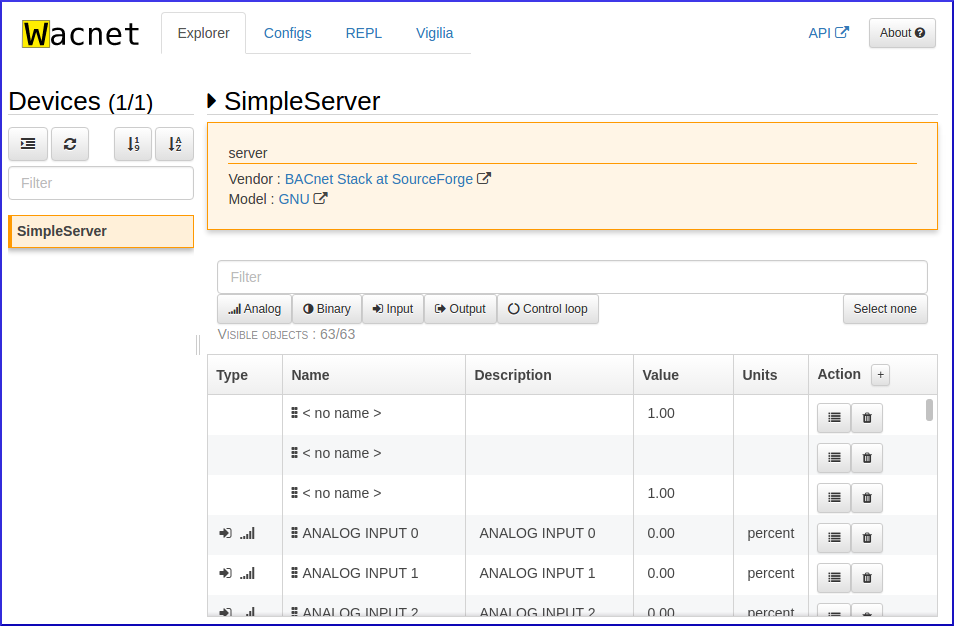
Automatically discover all BACnet devices on your network. Browse device properties, object lists, and values in a clean web interface.
REST API
Full CRUD API with Swagger documentation. Read and write BACnet objects from Python, Excel, or any HTTP client. Supports JSON, Transit, and EDN formats.
Interactive REPL
Power users get a Clojure REPL with direct access to the BACnet stack. Script custom operations, automate batch commands, or prototype integrations on the fly.
Vigilia Integration
Built-in logger for Vigilia — scan your BACnet network at regular intervals and push data to the cloud. Configurable parallel scanning for large networks.
No Installation
Single JAR file — runs on any machine with Java. No installer, no admin rights. Can even run from a USB key. Works on Windows, macOS, and Linux.
Headless Mode
Deploy on a server with --headless. Configure via command-line flags: custom ports, auto-start logging, no browser pop-up. Perfect for permanent installations.
System Requirements
| Java | 1.8 or newer |
|---|---|
| OS | Windows, macOS, Linux |
| Disk Space | ~100 MB |
| Network | BACnet/IP (UDP port 47808) |
| Web UI | http://localhost:47800 |
| REPL | nREPL on port 47999 |
Who Is Wacnet For?
- Building managers — See what's on your BACnet network without buying proprietary software.
- System integrators — Diagnose multi-vendor networks. Read objects, write commands, test points.
- Developers — Integrate BACnet into your applications via the REST API or Clojure REPL.
- Commissioning agents — Verify device configurations and control sequences during commissioning.
- Students & educators — Learn the BACnet protocol hands-on with zero barrier to entry.
About
Wacnet is a BACnet webserver and toolkit.
It can be started immediately without any installation, provided you have Java (min 1.8) installed on your machine.
You can browse a BACnet network using the Explorer, send commands on the network using the REPL or the web API, and record historical data with the help of Vigilia.
Wacnet is open source and comes with absolutely no warranty, like specified in the GPLv3 licence. The source code is on GitHub.
Why Wacnet?
BACnet promises interoperability between devices from multiple manufacturers — but the tools to actually use that interoperability have traditionally been expensive and complex.
Most commercial BACnet tools cost hundreds to thousands of dollars per seat, require installation wizards, license dongles, and vendor-specific training. Building managers often don't know what's on their BACnet network because the only way to browse it requires proprietary software. Developers face cryptic tools that make BACnet harder than it needs to be.
Wacnet changes that. Download a single file, double-click, and you're browsing your network in seconds. It's the Notepad of BACnet tools — free, simple, and always available when you need it. No license key, no subscription, no vendor lock-in.
| Wacnet | Typical Proprietary Tools | |
|---|---|---|
| Cost | Free (GPLv3) | $500 – $5,000+ / seat |
| Installation | None — single JAR file | Installer + license activation |
| Platform | Windows, macOS, Linux | Windows only (typically) |
| API | Full REST API + REPL | Rarely available |
| Network logging | Built-in (via Vigilia) | Separate product / add-on |
| Web-based UI | Yes — any browser | Desktop only (typically) |
| Scriptability | REST API + Clojure REPL | Limited or none |
| Source code | Open (GitHub) | Closed |
Wacnet is a modern, open-source alternative to YABE (Yet Another BACnet Explorer) and proprietary tools like CAS BACnet Explorer, designed for web-native workflows. Unlike YABE, Wacnet provides a full REST API for automation and integration, and unlike commercial tools, it costs nothing and runs on any platform.
Technical Capabilities
- BACnet Services: ReadProperty, ReadPropertyMultiple, WriteProperty (with priority levels 1–16), WhoIs/IAm, WhoHas/IHave, SubscribeCOV
- Network: BACnet/IP, BBMD support, Foreign Device Registration (FDR), routed BACnet/MSTP networks (via IP router)
- Object Types: All standard BACnet objects — Analog Input/Output/Value, Binary Input/Output/Value, Multi-state, Schedule, Calendar, Trend Log, Notification Class, and more
- API Formats: JSON, Transit+JSON, Transit+MessagePack, EDN — all endpoints CORS-enabled
- Automation: Clojure REPL (nREPL on port 47999) for scripting batch operations, custom BACnet sequences, and live prototyping
Quick Start Examples
List all BACnet devices on your network:
curl http://localhost:47800/api/v1/bacnet/devices
Read a temperature sensor (device 1234, analog-input 1):
curl http://localhost:47800/api/v1/bacnet/devices/1234/objects/analog-input.1
Python — scan and print all devices:
import requests devices = requests.get("http://localhost:47800/api/v1/bacnet/devices").json() for d in devices: print(f"Device {d}: {requests.get(f'http://localhost:47800/api/v1/bacnet/devices/{d}').json()}") Full API documentation is available via the built-in Swagger UI at http://localhost:47800/api/ once Wacnet is running.
Cross-Platform Support
- Windows 10/11 — Double-click the JAR or run from Command Prompt. No .exe installer required — Wacnet runs as a portable executable JAR file.
- macOS — Works out of the box with the built-in Java runtime. A lightweight BACnet tool for Mac users.
- Linux / Raspberry Pi — Ideal for permanent headless deployments. Run Wacnet on a Raspberry Pi as a dedicated BACnet gateway and Vigilia logger.
- USB portable — Copy the JAR to a USB key and run it on any machine with Java — no installation, no trace left behind.
Security & Footprint
- No admin rights or elevated privileges required
- Runs entirely inside the Java Virtual Machine (JVM) — no system-level modifications
- Does not "phone home" — all network traffic is local BACnet/IP only (unless you enable Vigilia cloud logging)
- No data collection, no telemetry, no analytics
- Open source (GPLv3) — audit the code yourself on GitHub
Usage
Getting the application
If you know Clojure, download the source and do lein uberjar.
If you do not, download the pre-packaged version at the top of this page.
Running the application
No installation necessary and can run from a USB key!
The standalone jar file can be started on any computer with Java installed. We recommend starting it from the command line as such:
java -jar <filename>
For example:
java -jar wacnet-2.1.9-standalone.jar
You can of course start it by simply double-clicking on the .jar file.
Once the application is started, go to http://localhost:47800/ and browse your network!
Command-line options
–web-port PORT Web server port (default 47800) –nrepl-port PORT REPL port (default 47999) –headless Run without GUI (for servers) –no-browser Don't open browser on startup -p, –project-id ID Vigilia project ID (auto-start logging) -k, –logger-key KEY Vigilia logger key -t, –time-interval MIN Scan interval in minutes (min 5)
Advanced
REPL
The REPL is an interactive evaluation environment to enable power users to use tools tailored to their needs. If a feature is lacking, it's even possible to add it on-the-fly!
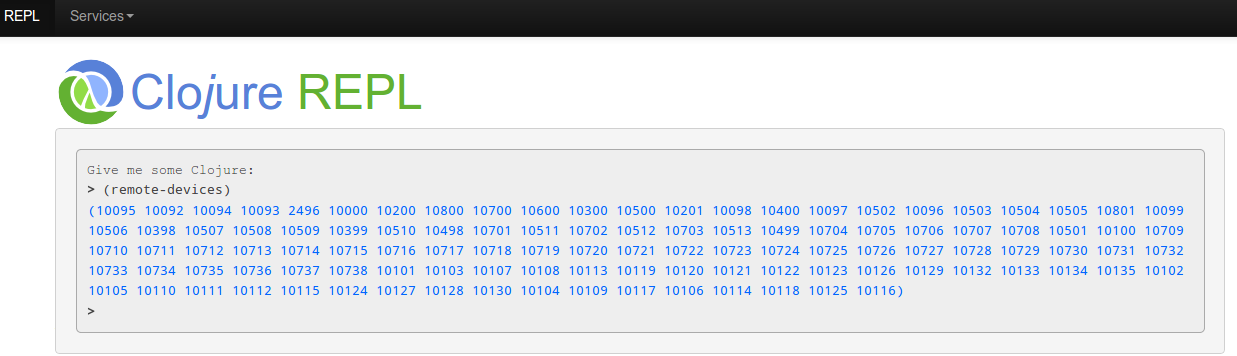
For a better experience, it is strongly suggested to connect to the REPL on the port 47999 instead of relying on the webpage.
One way to connect the REPL is to use Emacs with CIDER on port 47999.
Make sure you check the examples on the REPL page to get a glimpse of what is possible. Also take a look at the bacure documentation to learn the BACnet-related commands.
REST API
The API gives you access to the BACnet network without having to learn complex programming languages.
You're using Excel? HTML? A simple Python script? It doesn't matter, the API can immediately be used with your favorite environment.
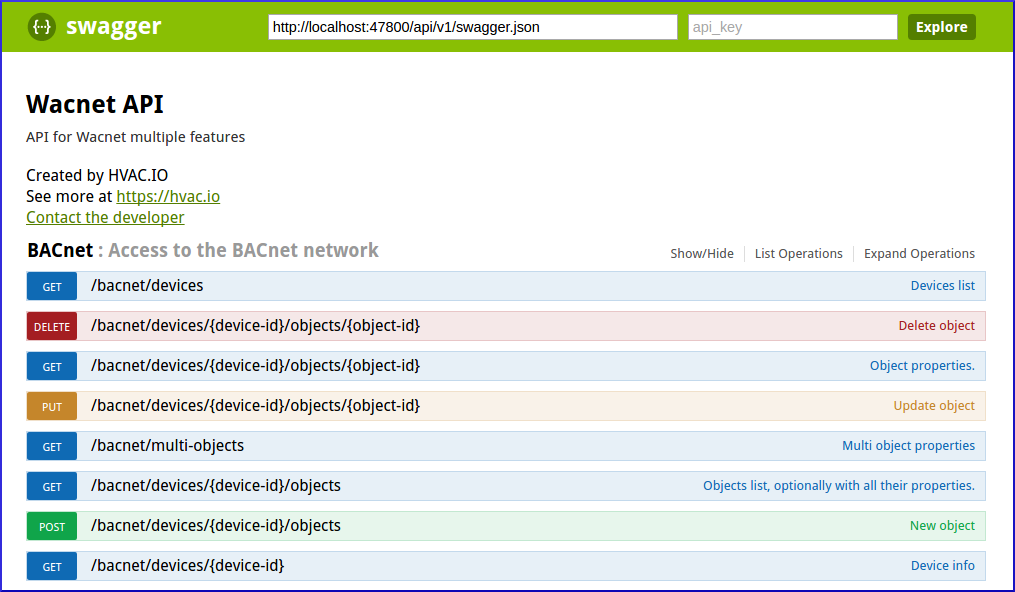
The API also has a Swagger interface describing the purpose of each endpoint, in addition to giving you the opportunity to try them directly in your browser.
Key endpoints:
GET /api/v1/bacnet/devices— list all BACnet devicesGET /api/v1/bacnet/devices/{id}/objects— list objects on a deviceGET /api/v1/bacnet/devices/{id}/objects/{obj}— read object propertiesPUT /api/v1/bacnet/devices/{id}/objects/{obj}— write to an objectPOST /api/v1/bacnet/devices/{id}/objects— create a new object
Responses are available in JSON, Transit+JSON, EDN, and Transit+MessagePack. All endpoints are CORS-enabled for browser-based integrations.
Data logging (Vigilia)
Wacnet comes with a built-in logger for Vigilia, enabling it to scan the BACnet network at regular intervals and push data to the cloud. Features include:
- Configurable scan intervals (from 5 minutes)
- Parallel device scanning for large networks
- Selective object targeting per device
- Device ID filtering (include/exclude ranges)
- Auto-start logging via command-line flags
- Proxy support for corporate networks
Please see this guide to start logging your network.
Frequently Asked Questions
Is Wacnet really free?
Yes. Wacnet is released under the GNU General Public License v3 (GPLv3). You can use it, modify it, and distribute it freely. The source code is on GitHub.
Does it work with BACnet/MSTP?
Wacnet communicates via BACnet/IP. If your MSTP devices are behind a BACnet router that bridges to IP, Wacnet can reach them — it supports routed networks and shows routing information.
Can I run it on a server permanently?
Yes. Use --headless --no-browser to run without a GUI. Combine with Vigilia flags to auto-start logging on boot.
How many devices can it handle?
There is no hard limit. Wacnet has been used on networks with hundreds of devices. For very large networks, you can run multiple instances scanning different device ranges.
Can I write values to BACnet objects?
Yes. Via the API or the REPL, you can write to any writable BACnet property with priority level support.
Warnings
Wacnet will usually try to discard most of the communication errors. For deep analysis, it's suggested to use Wacnet in combination of Wireshark: Send command manually with Wacnet and check the errors with Wireshark.
License
GNU General Public License version 3.0 (GPLv3)